
Windows 10 vs Windows 11: 5 Reasons to Stay on Windows 10

It has been two months since support for Windows 10 officially ended For a full ten years, this operating system was with us, and attitudes toward it evolved significantly: from skepticism in the very beginning, when it was not particularly stable or convenient, to genuine mass popularity at the end of its life cycle, when Windows 10 became a benchmark of stability and gained many useful features that neither Windows 7 nor Windows 8.1 ever had But all good things eventually come to an end, and we are forced to move on to new operating systems ,Although, strictly speaking, the word “end” is not entirely accurate here.
Windows 10 feels perfectly fine today and runs without issues on almost all modern PC hardware, as long as no artificial limitations have been imposed, Security is also in good shape, However, executives at Microsoft decided to “end” Windows 10 for regular PC users and gamers and push everyone onto Windows 11 by force, Users, on the other hand, were not impressed by Windows 11’s strange and inconvenient design, higher system requirements, and, most importantly, its numerous bugs, There have not been this many critical bugs and issues even at the launch of such not-so-successful Microsoft operating systems as Windows Vista or Windows 8.
Only in 2025 did the share of Windows 11 users finally surpass the number of those who remained loyal to the good old Windows 10, And yet it has already been four years since Windows 11 entered the market, having launched on October 5, 2021,. I fully understand users who do not want to leave the familiar, convenient, and reliable Windows 10, because I am one of them myself, Recently, I made my fourth attempt to switch to Windows 11, and although everything looked fine at first, after spending a few days on this OS I was completely exhausted and desperately wanted to go back to Windows 10, I will explain why below, For now, let’s look at several reasons why you can continue using Windows 10 for at least another year, even on a powerful gaming PC.
Contents
show
High System Requirements of Windows 11
At first glance, the minimum system requirements for Windows 11 look quite modest and hardly different from those of Windows 10. According to Microsoft, Windows 11 can run on hardware with a processor clocked at at least 1 GHz, featuring two or more cores, using a 64-bit architecture such as x64 or ARM64, and included in the official list of supported CPUs. The system requires at least 4 GB of RAM, 64 GB of free storage space, a graphics card that supports DirectX 12 or newer with a WDDM 2.0 driver or higher, and a display with a diagonal of at least 9 inches, a resolution of no less than 1280 × 720, and 8-bit color depth per channel. The firmware must support UEFI, Secure Boot, and TPM version 2.0.
In addition, an internet connection and a Microsoft account are required unless you deliberately use workarounds to bypass these restrictions. This requirement is so important to Microsoft that the company is gradually and consistently closing all loopholes that once allowed Windows to be installed the old-fashioned way, with a local account and without an internet connection, preventing the system from automatically downloading drivers. To upgrade to Windows 11 automatically through Windows Update, your system must also be running Windows 10 version 2004 or newer.
On paper, these requirements look very reasonable, and it may seem like Windows 11 can run on almost any old machine, but how it actually performs on such hardware is a completely different question. You also have to take into account the list of supported processors, which excludes even relatively capable models such as the Ryzen 7 1700 or the Core i7-7700K. To run Windows 11 on them, you have to apply tweaks during installation, starting with the creation of a bootable USB drive.
What is particularly amusing is that, for example, the Ryzen 5 1600 is not supported by Windows 11, while the almost identical Ryzen 5 2600 is officially supported. Meanwhile, the Ryzen 5 1600 AF, which is internally identical to the Ryzen 5 2600 and differs only in clock speeds, is also not supported. This seems to be the logic of Microsoft’s managers, who apparently made broad, sweeping decisions when choosing supported CPU generations without considering nuances, real-world performance, or actual feature sets.

On powerful PC configurations, you may not notice any performance difference between Windows 10 and Windows 11 at all. But once you install the new OS on a weaker PC, everything becomes obvious. For example, I installed Windows 11 on one of my PCs with a Ryzen 5 5600X, 32 GB of RAM, and a fast M.2 NVMe SSD, and noticed almost no difference, aside from File Explorer feeling a bit slower. This can be partially mitigated by disabling desktop and File Explorer animations, although the error log still occasionally recorded messages indicating that File Explorer delayed Windows shutdown by up to five seconds.
Later, I connected the same SSD with Windows 11 to another PC built around a Ryzen 3 2200G. I recently wrote about surviving on this machine in my blog article “[How I Survive on a Quad-Core Budget AMD Ryzen 3 2200G in 2025].” Despite the processor having four cores and 16 GB of RAM, Windows 11 feels significantly slower on this configuration than Windows 10. And this is not a bloated standard build of Windows 11, but the noticeably lighter Windows 11 LTSC 24H2. I also recently described its configuration in the article “[My Fourth Attempt to Switch to Windows 11, or How to Optimally Configure LTSC 24H2 for Gaming].”
An Inconvenient Windows 11 Interface
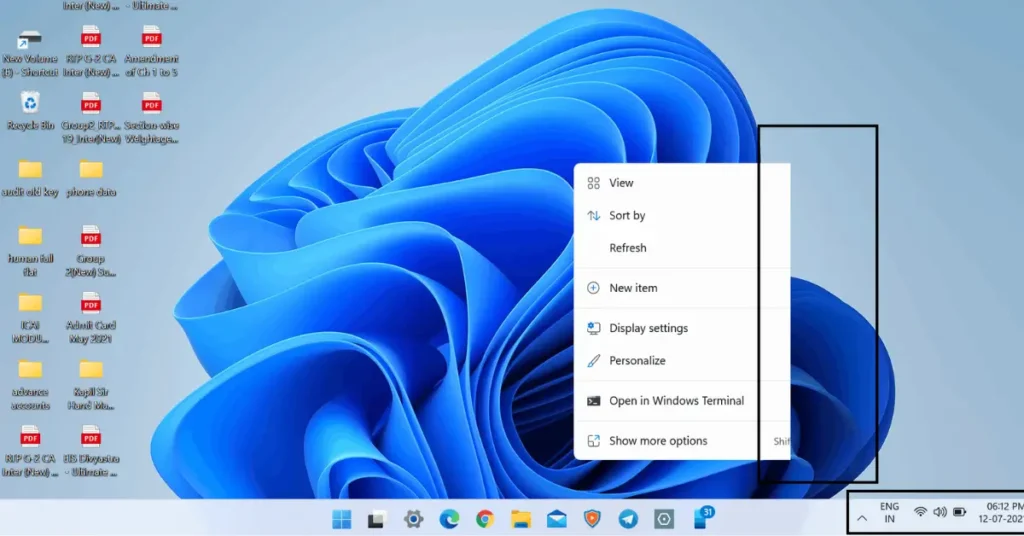
One of the main problems with Windows 11 is its clumsy and inconvenient interface. Switching to it from Windows 10 feels like stepping back into a ten-year-old version of Linux Mint. Awkward, overly simple icons, interface bugs, labels that do not fit inside windows, and incomplete localization are all immediately noticeable. We will not even bring up the much-suffering Start menu today, because it is actually possible to work in Windows without relying on it. What is much harder to explain is the stripped-down functionality of the taskbar and context menus, which users had been accustomed to for decades and which were removed without any logical justification.
Some of these issues can be partially addressed with utilities such as StartIsBack, but they remain workarounds with their own problems. For example, the sound icon in the system tray can shift relative to other icons when they are displayed together, making it impossible to click it instinctively without looking. StartIsBack also does not fix the issue of extremely narrow scrollbars, which appear as a thin thread just a few pixels wide even at Full HD resolution with 150 percent scaling. I took the time to count it on a screenshot, and the scrollbar width in this mode was only nine pixels. At the same time, in other parts of the interface, developers clearly did not spare pixels, as evidenced by huge gaps between buttons and text.
Windows 11 Bugs

There is no longer any doubt that Windows 11 is the most bug-ridden operating system Microsoft has released in the past 25 years. The sheer number and variety of bugs have flooded forums with users discussing solutions to their problems. I have never once managed to install Windows 11 from scratch using an official Microsoft image without encountering some kind of issue. During my most recent installation, after spending several hours configuring Windows 11 and installing and setting up all necessary software, I ran into a rare and particularly unpleasant bug.
Video playback was not smooth, both in browsers and in three different players: VLC, PotPlayer, and the built-in Windows 11 media player. It looked like footage recorded at under 20 frames per second and then artificially smoothed by software. I spent the entire evening trying to fix the issue, doing everything from reinstalling graphics drivers using DDU to reinstalling system codecs, but nothing helped. What I did notice was a connection to utilities that use overlays. For example, disabling MSI Afterburner restored smooth video playback in browsers, but not in media players.
The Unclear AI-Driven Future of Windows 11
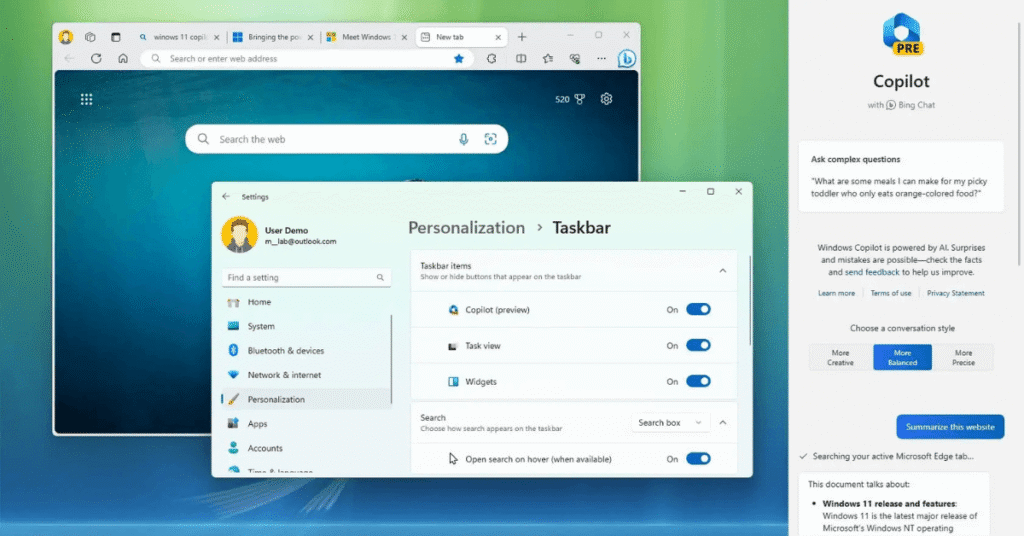
Microsoft is rapidly turning Windows 11 into a shell for the constant operation of multiple AI agents, despite strong negative feedback from users. In comments across social media, thousands of people are asking the company to stop stuffing the operating system with AI components and instead focus on stability, but Microsoft’s marketers seem to live in their own world. Meanwhile, anything related to AI triggers rejection among a significant portion of Windows users. This is especially true in light of scandals such as the one involving Gaming Copilot, Microsoft’s AI assistant, which turned out to collect user data by default, including screenshots taken during gameplay to train its model. All of this happens silently, without notifying the user.
Windows 10 Updates Can Be Received Until 2028
There are several guides and scripts available online that make it possible to extend the period during which Windows 10 receives Extended Security Updates. This can be done not only through 2026, but even all the way to 2028, which I personally managed to achieve using a script on Windows 10 Pro installed as my secondary system. As a result, there is no longer a need to rely on editions such as Windows 10 LTSC or IoT LTSC. A regular Pro edition can continue receiving updates for a long time while also preserving a fixed feature set similar to LTSC releases. Microsoft will no longer be able to undermine Windows 10’s stability with experimental AI integrations.
Final Thoughts
Under the hood, Windows 11 brings very little that is truly new.
So, what do we have in the end? If your PC or laptop is not built on the very latest hardware that genuinely requires Windows 11 to function properly, you can safely continue using Windows 10 for at least another year without any issues. This also applies to gaming PCs with Nvidia graphics cards, as driver support with optimizations for new games will continue until October 2026. Given the nature of Nvidia’s drivers, the practical lifespan of Windows 10 can easily be stretched to the end of 2027, especially if you are not playing the newest titles.
By the way, speaking of graphics cards, rising prices for electronics that rely on memory chips have caught up with GPUs as well. Popular GeForce RTX 5060 cards, which not long ago sold for 31,000 rubles, are now difficult to find for less than 34,000, and most listings on Yandex Market are approaching 40,000 rubles. Prices are also rising for the GeForce RTX 5060 Ti and Radeon RX 9060 XT with 16 GB of video memory, which will be the first to face supply cuts due to memory chip shortages.
The same can be said for popular high-performance graphics cards designed for gaming at 2560 × 1440 resolution, such as the GeForce RTX 5070 and GeForce RTX 5070 Ti. So if you were postponing a GPU purchase until better times, those better times are now being pushed back by at least a couple of years. At the moment, this may be the last opportunity to buy a graphics card at a reasonable price. Unfortunately, the same can no longer be said for RAM and SSDs.

I haven’t been working in the IT industry for very long, but ever since I was a kid I knew this was what I wanted to do. I started studying and tinkering with hardware when I was around 10 years old, although I had been using computers long before that , I used my first mouse at just 3 years old.
My studies focused on computer science topics, mainly cybersecurity. Over time, I discovered how much I enjoyed sharing hardware-related news and information with others.
Like many professionals in the industry, video games were one of my main motivations for getting into tech. They’re still a big part of my daily life, and I’m always keeping an eye on the latest announcements.
I’ve been working at PerfCore for a while now as a writer, and little by little I’m gaining experience in other roles as well such as doing in-depth product reviews and developing a more critical, analytical approach to hardware.