
Best budget gaming PC build under $600 in 2026

A $600 gaming PC is a tighter challenge in 2026 than it was two years ago. RAM prices are at a multi-year high, SSD costs crept up, and GPU pricing has not exactly been generous. That said, a smart build at this budget still destroys every gaming console on the market and handles 1080p at high settings in most titles.

The key word is smart. Spend the money in the right order and you get a machine that punches well above its price. Make the classic beginner mistakes and you end up with a bottlenecked system that leaves performance on the table.

Here is exactly what to build, what to skip, and what the real-world performance looks like.

What to realistically expect from a $600 build

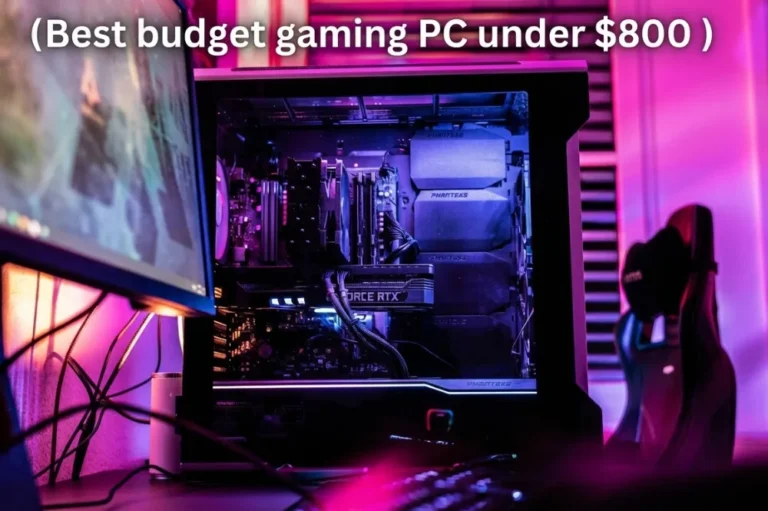
best budget gaming PC

No point sugarcoating it. At this budget in 2026, you are building a 1080p machine. That is not a downgrade. It is a perfectly valid target for the large majority of gaming titles and monitor setups most people actually own.

Here is what the Ryzen 5 5600 plus RX 7600 combo actually delivers:

  • Valorant, CS2, Apex Legends: 200 to 300+ FPS at 1080p
  • Fortnite at medium/high settings: 120 to 160 FPS
  • Cyberpunk 2077 at 1080p medium settings: 65 to 85 FPS
  • Call of Duty Warzone at 1080p high settings: 80 to 100 FPS
  • Spider-Man Remastered at 1080p high settings: 75 to 95 FPS

Competitive esports titles run at framerates that a 144Hz monitor cannot even display fully. AAA titles at 1080p high settings stay above 60 FPS in the vast majority of cases.

One thing that changes the equation significantly: the RX 7600 supports AMD FSR 3 with frame generation. In games that support it, enabling FSR 3 at Quality mode effectively multiplies your perceived frame rate. A title running at 60 FPS native can hit 100+ FPS with FSR 3 active, with only minor visual trade-offs. For a budget build, this feature alone is worth a lot.

The parts list: best budget gaming PC build for 2026

The parts list: best budget gaming PC build for 2026
ComponentPickApprox. Price
CPUAMD Ryzen 5 5600~$100
MotherboardB550 ATX (MSI B550-A Pro or similar)~$100
GPUAMD RX 7600 8GB~$249
RAM16GB DDR4-3200 (2x8GB)~$45
Storage1TB NVMe SSD (Gen3 or Gen4)~$65
PSU650W 80+ Bronze or Gold~$65
CaseMesh mid-tower with 1-2 front fans~$55
Total~$679

That lands above $600, and honestly that is the reality of building in mid-2026. If you find a sale on the GPU or RAM (both fluctuate by $20 to $40 regularly), hitting $620 to $640 with this exact spec is doable. Waiting for sales is a legitimate strategy at this budget tier.

If you want to hit the $600 ceiling without compromise on the GPU, the cheapest adjustment is dropping the case to a basic $35 to $40 option. Airflow matters but the Ryzen 5 5600 runs cool enough at 65W that a modest case is fine.

Why the Ryzen 5 5600 in 2026

Why the Ryzen 5 5600 in 2026

There is always a temptation to upgrade to a newer AM5 CPU when building a fresh machine. For a $600 build, resist it. The cost of the Ryzen 5 7600 plus a B850 motherboard plus DDR5 RAM adds roughly $150 to $200 over this AM4 configuration.

That extra money is almost always better spent on a better GPU. And at this budget, the GPU is everything.

The Ryzen 5 5600 is a six-core, twelve-thread CPU running on AMD’s Zen 3 architecture. Released in 2021 but still thoroughly competitive in 2026 because games rarely saturate more than six to eight threads in any meaningful way. At 1080p paired with the RX 7600, the CPU is not the bottleneck. The GPU determines your frame rate in virtually every title.

The one scenario where the 5600 shows its age is in extremely CPU-bound situations, like pushing 400+ FPS in CS2 or Valorant. If you are not a pro player who genuinely needs that level, it is completely irrelevant.

Also worth noting: the AM4 platform is still upgradeable. If you want more CPU performance in a year or two, a Ryzen 7 5700X3D or Ryzen 9 5900X drops straight into your existing B550 board without any other changes.

Why the RX 7600 over the RTX 4060 at this budget

Why the RX 7600 over the RTX 4060

The AMD RX 7600 and NVIDIA RTX 4060 are the two main GPU options at this price point. The 4060 costs roughly $40 to $60 more depending on when you shop.

At 1080p rasterization, the RX 7600 and RTX 4060 are very close. The 4060 has a small edge in ray tracing and DLSS 3 is stronger than FSR 3 in some titles. The 7600 has 8GB of GDDR6 at the same price where the 4060 also has 8GB, so no difference there.

The honest answer: either works. The RX 7600 is the better pick if you are trying to maximize performance per dollar and do not specifically need DLSS. The RTX 4060 is worth the premium if you play DLSS-heavy titles or want the better ray tracing experience in a game like Cyberpunk.

For a strict budget build where every dollar counts, the RX 7600 is the default recommendation.

What about RAM: 16GB vs 32GB at this budget

At $600, 16GB DDR4 is the right call. DDR4 is significantly cheaper than DDR5, and the performance difference in games between DDR4 and DDR5 in 2026 is about 3 to 5 percent. Spending $30 extra to go from 16 to 32GB makes more practical sense than spending $50 to switch to DDR5.

16GB is enough for gaming in 2026. You will only feel tightness if you run Chrome with 30 tabs, Discord, Spotify, and a game simultaneously. For pure gaming sessions, 16GB is comfortable.

If your budget allows, upgrading to 32GB DDR4 costs about $40 to $45 extra and future-proofs the system. But it is not the first upgrade priority.

One critical setting: enable XMP in the BIOS after your first boot. DDR4-3200 kits run at 2133MHz by default without it, which costs you noticeable performance for free.

Should you buy a pre-built instead?

Should you buy a pre-built instead

This question has a real answer at the sub-$700 price point. Pre-built deals have gotten surprisingly competitive in 2026, especially from brands like Lenovo IdeaCentre, HP Pavilion Gaming, and occasionally direct from ASUS or Acer.

If you find a pre-built with a six-core CPU, 16GB of RAM, a 512GB or 1TB SSD, and an RX 6700 or RTX 3060 for under $600, it is worth considering. The catch is almost always the power supply. Pre-builders at this price regularly include low-quality PSUs with no rating certifications. That is the component most likely to fail and take other parts with it when it goes.

DIY at this budget is harder than it looks compared to $800 or $1,000. But you get to choose every part, pick a quality PSU, and have a machine you understand and can actually repair. That matters more than it sounds.

Upgrade path after building

Upgrade path after building

The appeal of this build is not just what it does today. It is where it can go.

Short term (6 to 12 months):

  • Add a second stick of RAM if you bought one stick to start (run dual-channel for free performance)
  • Upgrade to 32GB if you use your machine for content creation or streaming

Medium term (1 to 2 years):

  • Drop in a Ryzen 7 5800X3D or Ryzen 9 5900X on the same B550 board
  • Add a second SSD for game storage

Longer term:

  • GPU upgrade to an RX 9060 or RTX 5060 tier when prices drop further
  • At that point you may also want to evaluate a full platform migration to AM5

The AM4 platform is mature but not dead. AMD has confirmed continued Ryzen 5000 support, and the value proposition on this socket is still real.

First thing to do after building

Do not just plug it in and start gaming. Your system will perform noticeably below its potential out of the box.

The three things that make the biggest immediate difference:

  1. Enable XMP in the BIOS — takes two minutes and fixes your RAM running at half speed
  2. Install GPU drivers from AMD.com — not from Windows Update; the manufacturer’s site always has better optimized versions
  3. Switch to High Performance power plan — Windows defaults to Balanced, which throttles your CPU during gaming

We cover all of these adjustments in detail in our complete gaming PC optimization guide, including a few Windows tweaks that add another 10 to 15 FPS without touching the hardware.

And if you want to understand the full component selection process before buying anything, start with our gaming PC build guide for 2026 which covers every budget tier from $600 up to $2,000+.

Allen Wade

I haven’t been working in the IT industry for very long, but ever since I was a kid I knew this was what I wanted to do. I started studying and tinkering with hardware when I was around 10 years old, although I had been using computers long before that , I used my first mouse at just 3 years old.
My studies focused on computer science topics, mainly cybersecurity. Over time, I discovered how much I enjoyed sharing hardware-related news and information with others.
Like many professionals in the industry, video games were one of my main motivations for getting into tech. They’re still a big part of my daily life, and I’m always keeping an eye on the latest announcements.
I’ve been working at PerfCore for a while now as a writer, and little by little I’m gaining experience in other roles as well such as doing in-depth product reviews and developing a more critical, analytical approach to hardware.

Leave a Reply

Your email address will not be published. Required fields are marked *